Table of Contents
As of July 2025, the WordPress Security Team will no longer provide security updates for WordPress versions 4.1 through 4.6.
These versions were first released nine or more years ago and over 99% of WordPress installations run a more recent version. The chances this will affect your site, or sites, is very small.
If you are unsure if you are running an up-to-date version of WordPress, please log in to your site’s dashboard. Out of date versions will display a notice that looks like this:

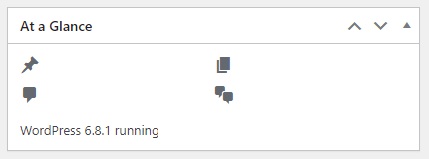
The version you are running is displayed in the bottom of the “At a Glance” section of the “Dashboard”.
As a reminder, the only actively supported version of WordPress is the most recent one. Security updates are only backported to older branches as a courtesy.
The Make WordPress Security blog has further details about the process to end support.
Why It’s Important to Update Your WordPress Website
Keeping your WordPress site up to date is important for security, performance, and overall user experience. Regular updates help protect your site from vulnerabilities, ensure compatibility with the latest plugins and themes, and improve site speed and functionality.
Outdated versions of WordPress, plugins or themes can create serious security risks, leaving your site vulnerable to hackers and malware. By updating regularly, you close these security gaps and keep your content safe.
In addition to security, updates often include new features, bug fixes, and performance improvements. Keeping up-to-date helps your site run faster and smoother, providing a better experience for your visitors. It also ensures that your site remains compatible with new browsers, devices, and SEO requirements.
Whether you run a blog, a business website, or an online store, updating WordPress is a crucial part of website maintenance. It’s a simple step that can save time, protect your investment, and support long-term growth.
Key benefits of the WordPress update:
Email: manager@webcodewp.com